
If you are new to the University and have not logged in to the system yet:
Undergraduate / Graduate Students:
Your Student ID can be located on the right-hand side of the main page of the Admissions Portals.
-
Undergraduate: https://apply.stjohns.edu/apply
-
Graduate: https://grad.stjohns.edu/apply/
Also, when you are accepted to your school, the Admissions office sends an acceptance letter with your X number on it. It begins with the letter X and has 8 digits, for example: X00000001.
SJU Employees/Faculty:
When you are hired, Human Resources sends a New Hire package containing your X number. It begins with the letter X and has 8 digits, for example: X00000001.
Affiliates:
When you are hired as an affiliate or consultant, your supervisor will receive an email containing your A number. It begins with the letter A and has 8 digits, for example: A00000001.
College Advantage members:
When you are entered into College Advantage, an email is sent confirming your enrollment and listing your X number. It begins with the letter X and has 8 digits, for example: X00000001.
If you are already able to log in to the University’s systems and need to locate your ID number, you can use the following resources:
New UIS Experience:
-
Log in to https://signon.stjohns.edu , and click on the NewUIS app.
** If you are a newly admitted student and have never logged in to the Sign-On Portal, please follow these instructions to log in: Welcome to the St. John's University Sign-On Portal Guide. -
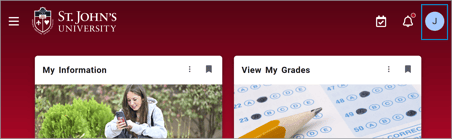
Click on your Profile Initial in the upper-right corner of the screen.
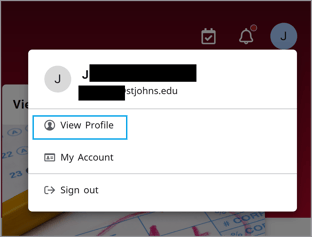
- Click on View Profile.
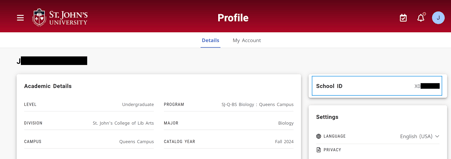
- Under School ID will be an 8-digit number that begins with a letter X or an A. This is your University ID number.
Connect App:
-
Visit: https://connect.stjohns.edu, or download the St. John’s U Connect mobile app.
(See: How do I download and log in to the Connect App?).
- Click on the avatar in the upper right corner and click on “View Profile.”
- If you are on the web browser:
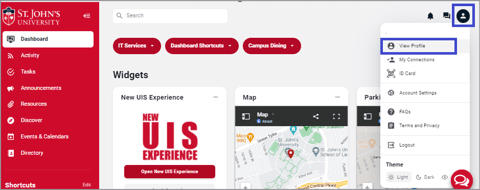
- If you are on the mobile app:
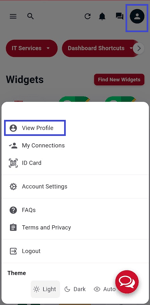
-
Your ID number will be listed under “Private Information.”
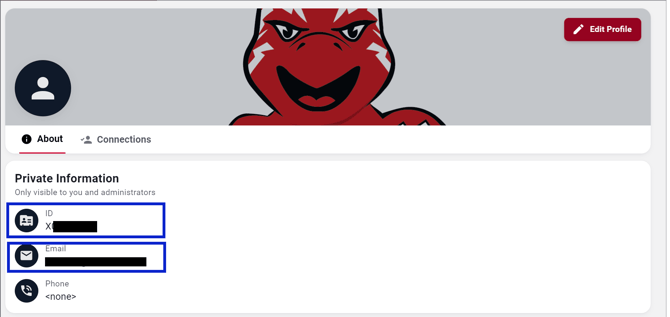
- If you are on the web browser:
If you are a former student:
Former students who do not remember any of their ID numbers and need to request a copy of their transcripts can contact the Registrar's office at 718-990-1339, or follow these instructions to receive an e-Transcript in 24 hours:
How do I request an e-transcript?